


Here are a few features in this version:
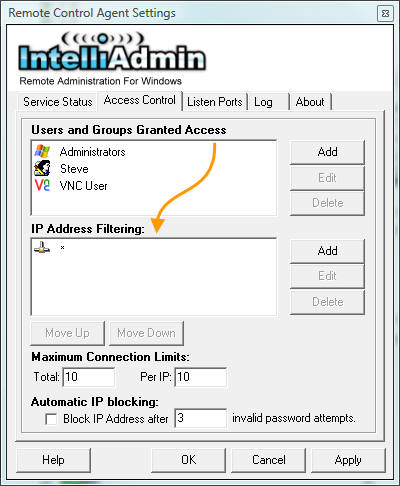
IP Address Filtering - You only want specific ranges of IP addresses connecting to a machine? It is easy with our IP address filtering. Add multiple rules to fill your needs:
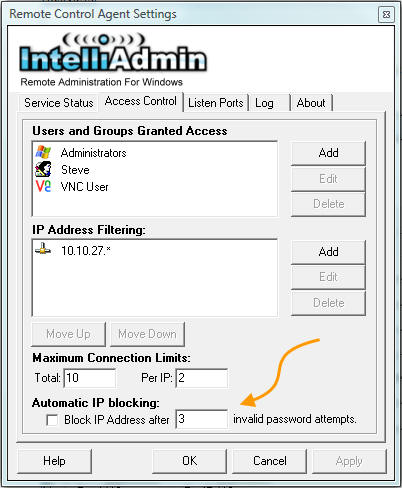
Automatic IP Blocking - If you have a machine that is directly connected to the internet you don't want hackers to brute force your username and password. Simply enable Automatic IP blocking, and an IP address will be blocked for 15 minutes if the wrong password is used more than 3 times.
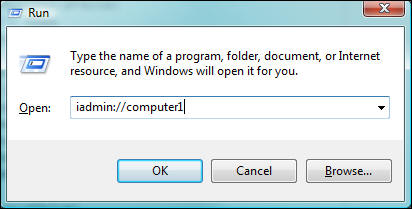
Integrate into your Help Desk Software - Any setting in our client can be sent to it through the command line. Remote Control 3.0 has registered the iadmin:// URL. This can be used to automatically launch and connect the client to a machine. Check out our command line reference for more details
Request Permission - You can ask permission before connecting, or better yet you can force your IT administrators to ask permission. I know many of you have been looking for this feature. CEOs don't like IT staff just jumping into their system while they could be working on sensitive documents - this will keep them at ease when you tell them you want to use Remote Administration software. When the option is enabled, the remote side is prompted with a window that looks like this:
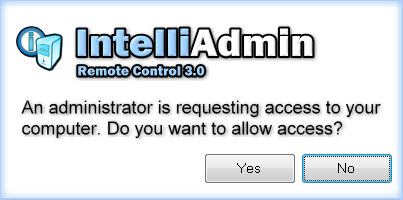
If the user rejects you, you will be told to try again later. If they accept it will immediately give you access to the remote system.
That's all I have for now, take it for a spin and download our 15 day trial:

Posted By: Steve Wiseman on Friday, November 14, 2008
Check out our utilities for windows